
Legal task management software
Assign tasks to your team with legal task management software
Increase productivity and keep your firm’s workflow running smoothly with legal task software built for law firms. Assign tasks to the right person and get notified of new assigned tasks, edited tasks and completed tasks, so nothing waits on a reminder that never came.
Works for solo attorneys, mid-size firms and large firms. No card required.
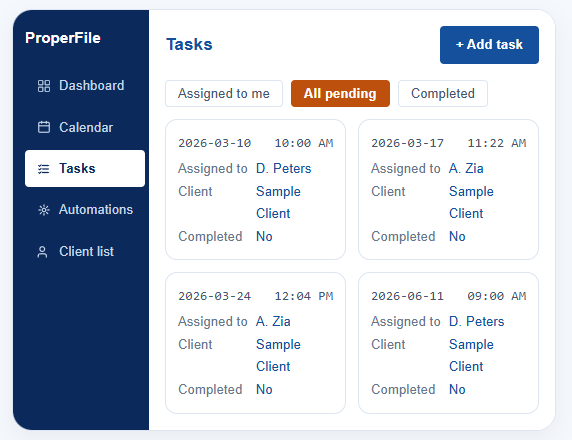
An illustration of the task manager. Sample data shown.
Task manager
Stay on top of your to-do’s and do more with law firm task management
Two halves of the same job: getting work to the right person, and making sure everyone knows the moment it moves.
Tasks
- Assign tasks to a single user or multiple users
- Assign tasks from the task manager or directly in the client’s portal
- See all upcoming or overdue tasks in the task manager
Every task hangs off the matter it belongs to, so the work and the file stay together. Tasks created from a matter in our legal case management software carry the client, the practice area and the deadline with them.
Notifications
- Get dashboard notifications every time a new task is assigned
- Notifications are also sent via e-mail whenever new tasks are assigned, edited or completed
Because assignment and completion are both logged, a task closed on Friday is time you can still bill. See time and expense tracking for how entries turn into invoices.
Frequently asked questions
Questions about task assignment and permissions
That depends on the role you give them. Attorneys and administrators can assign work to anyone in the firm, and you can restrict other roles to assigning only to themselves. Permissions are set per role in the admin panel, so a paralegal can be given delegation rights without gaining access to billing or firm reporting.
Yes. The task manager filters by assignee, by matter and by status, so you can pull up everything sitting with one paralegal or everything overdue across the firm. Users with matter-level restrictions only see tasks on the matters they have access to.
Everyone attached to the task. The assignee is notified when work lands with them or changes, and the person who assigned it is notified when it is completed. Notifications appear on the dashboard and go out by email, and each user can adjust which emails they receive.
Put your firm’s task list somewhere everyone can see it
Ninety days free with your own matters loaded. Assign real work to your real team and watch what stops falling through.