
EMAIL TEMPLATES
Write the Email Once. Send It to Every Client in Seconds.
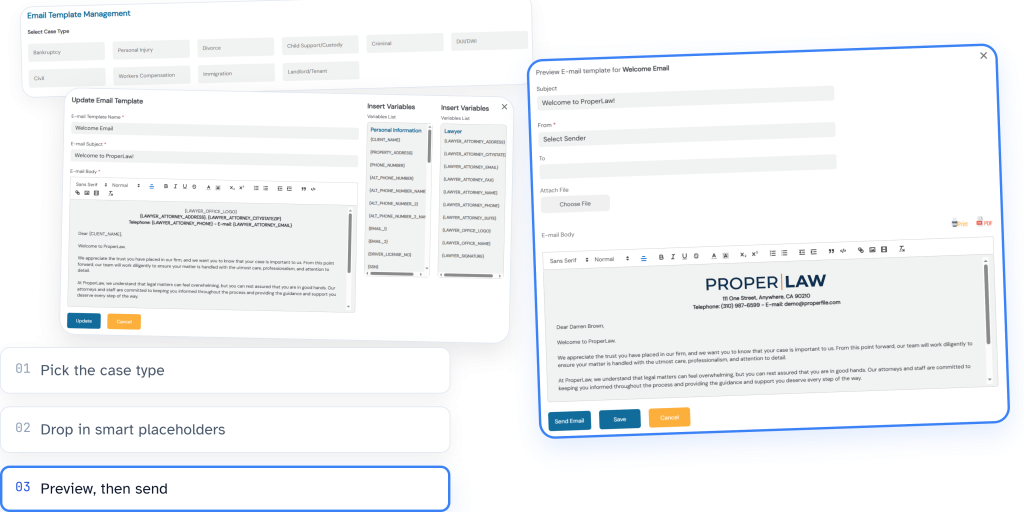
Create a template once and reuse it for every client. Smart placeholders fill in the name, address, and case number automatically, so your messages stay fast, accurate, and consistent every time.

Type It Once. Not Every Time.
See the difference a smart template makes.
The old way
Without templates
- Type the client's name, every time.
- Re-enter the case number, every time.
- Rewrite the same welcome message, every time.
With ProperFile
With email templates
- Build the template once.
- Smart placeholders fill in the name, address, and case number.
- Send it in seconds, to every client, every time.
Consistent, on-time messaging is also the backbone of strong client follow-up. See how it pairs with lead management.
FEATURES
One Tool. Seven Ways It Saves You Time.
Open a tab to see what it does.
Smart Placeholders
Every template can pull in your client's name, address, and case number automatically using smart placeholders, chosen from a long list of available options, so you're never retyping the same details. Set up a welcome email or a case-filed notice once, and it's ready to send in seconds.
Attachments
Attach up to 5 files (PDFs, images, and more) right in the preview window your client sees inside their portal, so the paperwork arrives together with the message.
Case-Type Categories
Organize templates by case type, so the right message is always easy to find no matter how many you build out.
Admin-Only Access Control
Only users with administrator access can create, edit, or delete templates, keeping your firm's client communication consistent and under control.
E-Mail Signatures
Add an e-mail signature once, then choose whether it appears on each individual template. Full control, every time you send.
Draft with AI
Describe what the email should say, or paste one you already send, and the AI writes the subject and body for you using ProperFile's placeholders. It opens in the editor so you can check it before saving.
Translate Automatically, Up to 8 Languages
Turn on Spanish, Vietnamese, Chinese, Korean, Tagalog, Russian, French, or Portuguese, and every template is translated by AI. Each client gets their preferred language automatically, and a translation can be reviewed before it is sent.
Get Started Today With a Free Trial
See how templated email keeps your firm’s client communication fast, consistent, and yours to control.