
Legal billing software
Legal Time & Expense Tracking Software for Law Firms
We know time is money, that’s why we have added a simple but powerful attorney time tracking tool to keep track of your time entries and expenses. Capture more billable time and less time trying to figure out how much time you have spent working on a given case.
- Built-in clock to record your work in real-time
- Record expenses
- Standard and Customize rates for all Users
- Review and adjust time/expense entries directly from the client portal
- Generate PDF invoices that reflect time/expense entries by date range
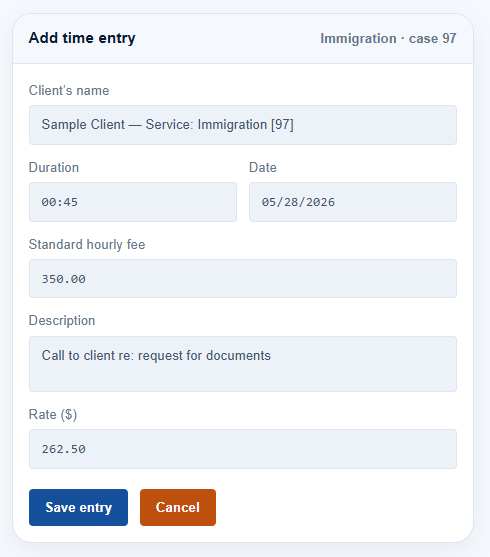
Attorney time tracking
Time entry and expense tracking that bills every minute of the case
With this simple but easy to use legal time tracking tool you can be sure you are billing your clients for every minute spent on a given case.
Manually enter time directly in the client’s file or use the running clock when you start a job.
Time entries can also be entered directly from the firm’s calendar to account for any events.
Standard or Customizable rates for all your active users.
Accounting for all time entries and expenses has never been easier.
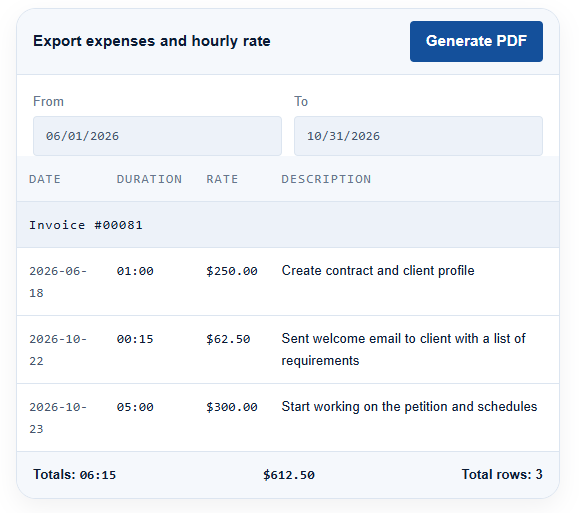
Billable hours
Law firm billing software that tracks every billable hour and expense effortlessly
Accurate time tracking and expense tracking for attorneys. We make it easy and simple. Bill in real time to increase productivity and cash flow at the same time.
- Flat fee, hourly and contingency invoices from the same ledger
- Attorney fees and cost or filing fees tracked separately
- Export any invoice to PDF for the client or your records
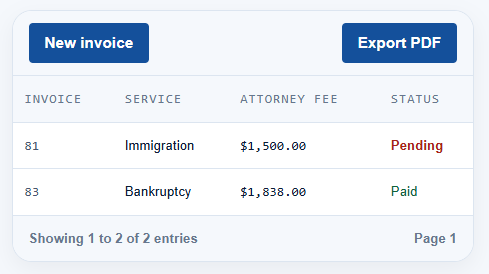
An illustration of the invoices screen. Sample data shown.
Frequently asked questions
Common questions about legal time tracking
Yes. Anyone with billing permissions can enter time on behalf of another user, and the entry records who performed the work as well as who entered it. Each user carries their own standard rate, so an entry billed for a paralegal uses the paralegal rate even when an administrator keys it in.
Yes, until the entry is locked to a finalized invoice. Duration, rate, type and description are all editable, and every change is kept in the audit trail with the user and timestamp. Entries that have already been billed are credited rather than silently rewritten.
The clock keeps running on the server, so nothing is lost when you close the tab or your session expires. When you sign back in the running timer is waiting on the matter, and you can adjust the duration before saving the entry if the clock ran past the work.
Try the legal billing software free for 90 days
Ninety days with your own matters loaded. Run the clock on real work and see what your firm actually bills. Built for solo attorneys, mid-size and large firms.