

ProperFile is designed to fit the needs of Lawyers in all practice areas.
Quick Links
Contact Us
5800 S Eastern Ave, Suite 500, Commerce, CA 90040
+1 (800) 303-4522
info@properfile.com
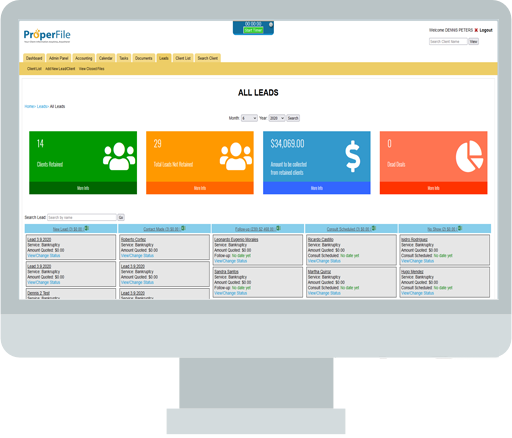
Keeping track, managing and converting your prospecting leads into actual clients has never been easier using our lead management system.

Lead Management dashboard that allows you to keep track of all leads through all stages. From initial client contact to client retention.
We give you the tools you need to accurately pinpoint how your firm is generating clients. Easily set up your lead sources and ad placements giving you a clear understanding to change and improve client retention.
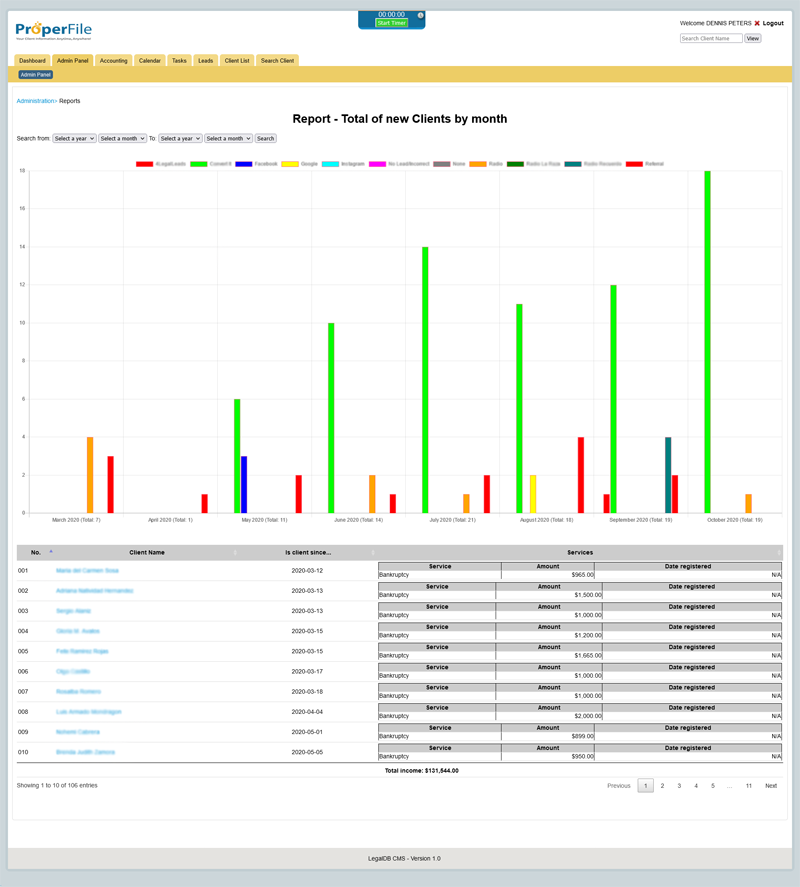
Providing your with accurate reporting to help keep growing your business. Always know what’s working and adjust your marketing strategy based on real numbers.
Our system works hand in hand with other features from customizable client intake forms to obtaining electronic signatures for retainers. One simple solution for all your needs.
It's really up to you, however, we always recommend saving the name, address, telephone number and e-mail. You will however, be required to enter the lead source and ad placement source. Other information collected is based upon the client intake form which is fully customizable through the Admin Panel.
Stats are updated the second you enter information on your client system. We provide real time stats.
We provide you with six (6) different categories for lead status. Any new lead will begin with a "New Lead" status and will automatically show in the "New Lead" column in the Leads Dashboard, from there, you can change the Status to "Contact Made", "Follow-up", "Consult Scheduled", "No Show" and "Dead Lead". These Status types are permanent and cannot be modified.
5800 S Eastern Ave, Suite 500, Commerce, CA 90040
+1 (800) 303-4522
info@properfile.com